
September 21, 2026
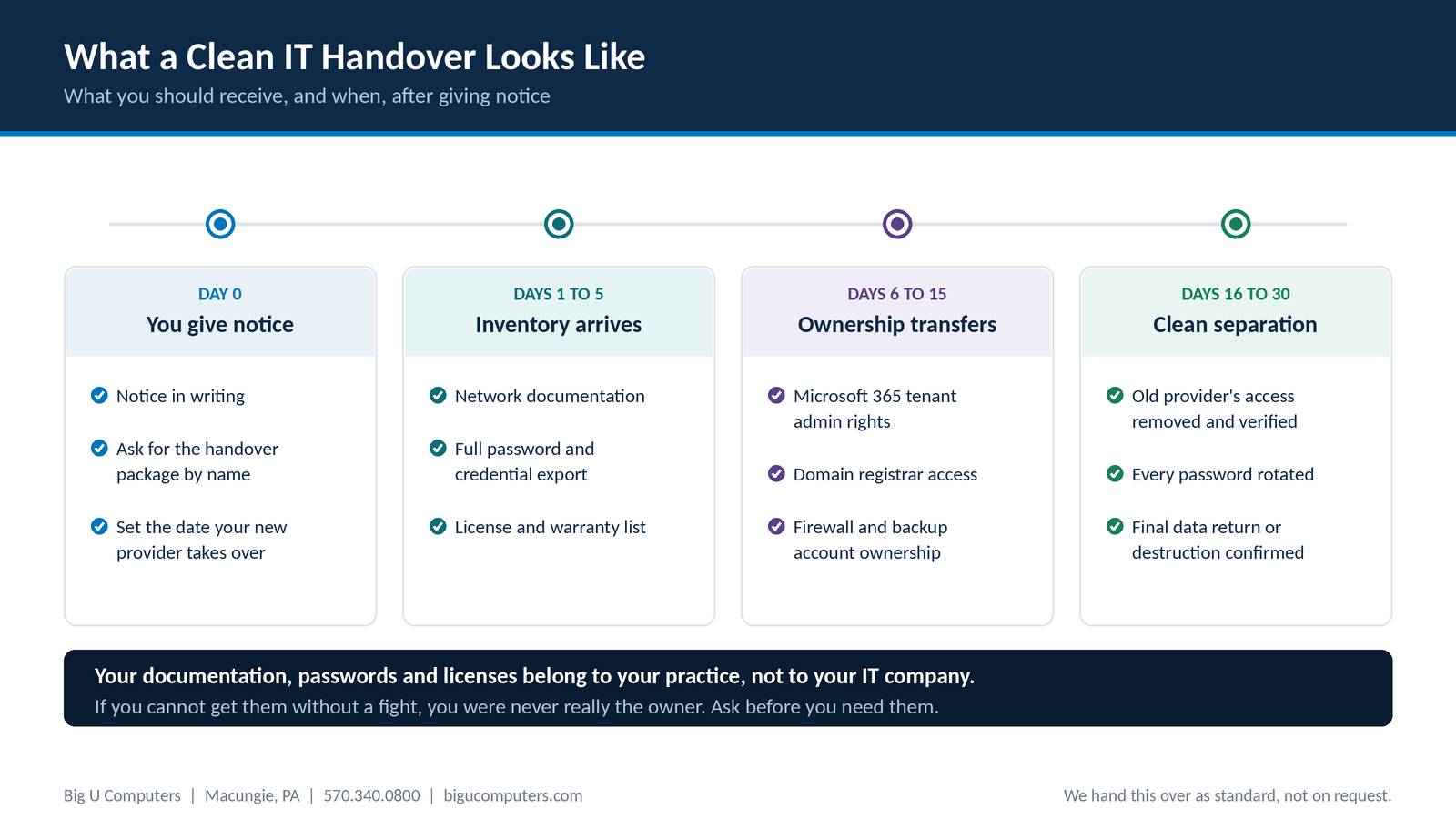
What a practice should receive, and when, after giving notice to an outgoing IT provider.
Your network documentation, passwords, licenses, and account ownership belong to your practice. In a clean handover you should have all of it within about 30 days of giving notice, and most of the paperwork within the first week. In reality, many practices discover at exactly the wrong moment that they were never given any of it, that their Microsoft 365 tenant is administered by their IT company rather than by them, or that nobody at the practice knows where the domain name is registered. None of that is illegal. It is simply a position you should never have been in.
The good news is that you can check where you stand in about twenty minutes, and you do not have to be leaving your provider to do it.
What You Should Already Have in Your Hands
This is the inventory. You should be able to produce all of it today, without asking anyone.
| What you should have | What it is | Why it matters |
|---|---|---|
| Network documentation | A written map of what you own and how it is connected | Nobody can support you well without it, including your next provider |
| Password and credential export | Every account used to run your systems | Without it your new provider has to rebuild access from scratch |
| Microsoft 365 tenant ownership | Global administrator rights to your own tenant | If your provider holds this, they control your email and files |
| Domain registrar access | The account where your domain name is registered | Lose this and you can lose your email and website entirely |
| Firewall and network device credentials | Admin access to the equipment in your building | Otherwise the hardware you paid for cannot be reconfigured |
| Backup account ownership | The account your backups are stored under | Backups you cannot reach are not backups |
| Software license records | What you own, how many seats, renewal dates | Prevents paying twice or losing coverage at renewal |
| Hardware and warranty list | Serial numbers, purchase dates, warranty status | Needed for budgeting and for warranty claims |
The rows about ownership matter more than the rows about documentation. Documentation can be rebuilt with effort. If your IT company is the registered owner of your Microsoft 365 tenant or your domain name, they hold something you cannot rebuild, and recovering it depends on their cooperation.
Six Signs You Are Not Actually the Owner
None of these mean your provider is acting in bad faith. Some are just how things were set up years ago and nobody revisited it. But each one is worth resolving.
1. You cannot name where your domain is registered
Your domain name is what your email address depends on. If nobody at your practice knows which registrar holds it or who controls that account, that is the first thing to fix.
2. Your Microsoft 365 global admin is your IT company, and only your IT company
It is completely normal for your provider to have administrative access. It is not normal for them to be the only ones who do, with no account controlled by the practice.
3. Asking for your password list produces hesitation
A provider who documents properly can export this in an afternoon. If the request causes friction, that tells you something about how the relationship would end.
4. Your backups live in an account you have never seen
Ask whose name the backup account is in and whether you could log into it. A backup you cannot reach without your provider is a dependency, not a safety net.
5. Your licenses are purchased under your provider's account rather than yours
This is common and often done for convenience or volume pricing. Just know that it means your software follows them, not you.
6. There is no written documentation of your network at all
If nothing exists on paper, the knowledge of how your systems work lives in one person's head. That is a risk even if you never change providers, because people take vacations and leave jobs.
What a Clean Handover Looks Like, Day by Day
If you do decide to change, this is a reasonable shape for the transition. Share it with both the outgoing and incoming providers so everyone is working to the same plan.
Day 0: you give notice
Put it in writing, ask specifically for the handover package rather than a vague request for cooperation, and set the date your new provider takes over. Check your agreement for the notice period first, because many require 30 days or more and some auto renew if you miss the window.
Days 1 to 5: the inventory arrives
Network documentation, a full password and credential export, and the license and warranty list. This is paperwork rather than technical work, so there is no good reason for it to take longer.
Days 6 to 15: ownership transfers
Microsoft 365 tenant administrative rights, domain registrar access, firewall and network device credentials, and backup account ownership. This is the part that requires actual cooperation, and it is where transitions slow down.
Days 16 to 30: clean separation
Your new provider removes the old provider's access and verifies it is gone, rotates every password that was shared, and confirms in writing that your data has been returned or destroyed. That last item is not just good practice. If your outgoing provider was a business associate under HIPAA, their agreement with you almost certainly requires it.
The Smart Move Is to Ask While You Are Still Happy
Here is the part most articles about this leave out. The best time to request your documentation is when you have no intention of leaving.
Send a short, friendly email. Something like: for our own records and continuity planning, could you send us current network documentation, a credential export, and confirmation of who holds ownership of our Microsoft 365 tenant and domain.
A good provider sends it without blinking, because they already maintain it. A provider who stalls, asks why, or quietly never gets to it has told you something useful at zero cost, while you still have time to do something about it.
Then store what you receive somewhere the practice controls, and put a reminder in the calendar to refresh it once a year.
What to Put in the Agreement Before You Sign
If you are evaluating a new provider right now, these four items belong in the contract.
- A statement that all documentation, credentials, and license records are the property of the practice.
- A handover window with a number of days attached, triggered by written notice.
- A requirement that accounts such as your Microsoft 365 tenant and domain registration are held in the practice's name from the start, with the provider granted access rather than ownership.
- Confirmation of data return or destruction at the end of the relationship, which should already appear in your Business Associate Agreement.
Why This Matters More for a Healthcare Practice
For most small businesses, a messy IT transition is expensive and annoying. For a practice holding client records, it is also a compliance issue.
- You are required to know who has access to systems containing client information. If a former provider's accounts are still active, you cannot honestly say you do.
- Your Business Associate Agreement almost certainly requires return or destruction of client information at termination, and you should get that confirmation in writing.
- If the Office for Civil Rights ever asks about your safeguards, much of the evidence is in the documentation your provider holds. Not having it is a problem before anything has even gone wrong.
- Orphaned administrative accounts are a genuine security exposure, not just an administrative loose end.
How We Handle It
We give every client full written documentation of their network, licenses, hardware, and passwords, in plain language, as part of the service rather than on request.
We do it because an IT company that keeps clients through dependency rather than through service is not a company we want to run. If you ever leave us, we would rather you leave cleanly and tell people we were straight with you.
If you are with another provider and cannot get a straight answer about any of this, call us. We will tell you what to ask for and how to check it, whether or not you end up working with us.
Not sure who actually owns your accounts? Call 570.340.0800 or book a free consult. We will walk the list with you in about twenty minutes, no charge and no obligation.
Big U Computers | P.O. Box 523, Macungie, PA 18062 | 570.340.0800 | bigucomputers.com