
September 21, 2026
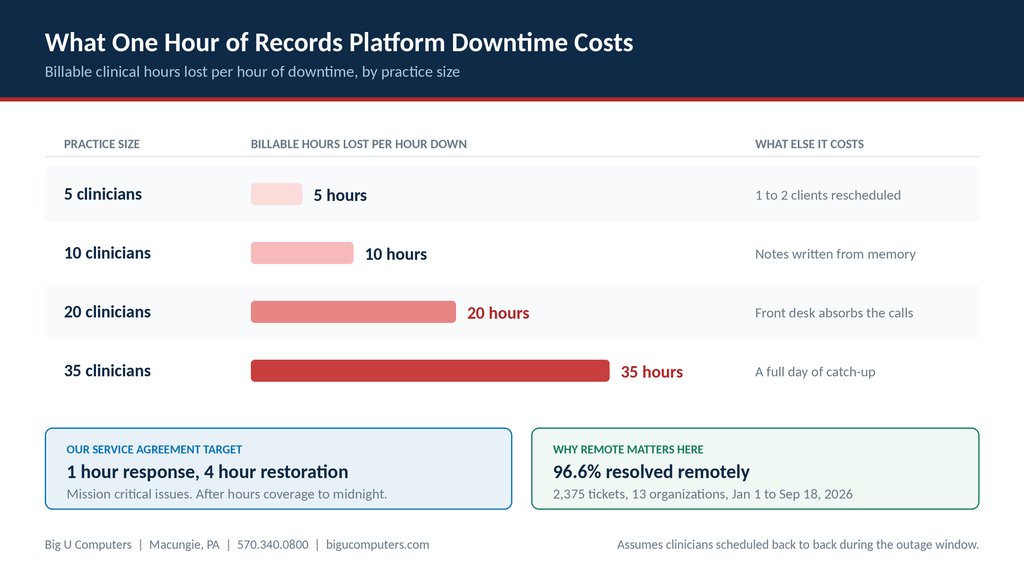
A practice with eight clinicians seeing clients back to back loses roughly eight billable clinical hours for every hour its records platform is unreachable. The hours do not come back. Clients get rescheduled, notes get written from memory that evening, and the front desk spends the afternoon on the phone. Our service agreement sets a one hour response target and a four hour restoration target for mission critical issues, with after hours coverage running to midnight on business days. The part most practices do not realize: most outages are not the platform being down. They are something on your side of the connection, which means they are usually fixable in minutes.
Here is what an outage actually costs, how to tell in five minutes whose problem it is, and what a practice should have ready before it happens.
The Real Cost of One Hour of Downtime
Downtime is usually discussed as an IT problem. It is a clinical and financial one. Every hour the records platform is unreachable is an hour of scheduled clinical time that cannot be documented, and in most practices that means it cannot be billed as normal.
| Practice size | Billable hours lost per hour down | What else it costs you |
|---|---|---|
| 5 clinicians | 5 hours | 1 to 2 clients rescheduled |
| 10 clinicians | 10 hours | Notes written from memory that evening |
| 20 clinicians | 20 hours | Front desk absorbs the calls all afternoon |
| 35 clinicians | 35 hours | A full day of catch-up documentation |
The second column is the part that gets underestimated. A two hour outage at a twenty clinician practice is forty billable hours of disruption, plus an evening of documentation written from memory, which is both a quality concern and a compliance one.
This is why a response target belongs in the service agreement rather than in a sales conversation. Ask any provider to show you where theirs is written down.
Is It the Platform, or Is It You? A Five Minute Check
Before anyone calls anyone, run this. Your front desk can do it, and it decides who you should be calling. Calling the wrong party costs you twenty minutes you do not have.
Step 1. Is it one person or everybody?
Ask a second person to try. If one clinician is locked out and everyone else is working normally, it is an account or device problem, not an outage.
Step 2. Try it on a phone using cellular data, not office Wi-Fi
If the platform loads fine on cellular but not in the office, the platform is up. Your internet or network is the problem. This single step resolves the question more often than any other.
Step 3. Check the vendor's status page
Every major records platform publishes one. Bookmark it now, before you need it, and put the link on a card at the front desk.
Step 4. Try a different browser on the same computer
If it works in a second browser, the problem is local to that machine or that browser. Your IT provider can fix that quickly.
Step 5. Decide who to call
Everybody affected, on every device, and the vendor status page is clean? That points at your network. Call your IT provider. Status page showing an incident? Call nobody, and move to your downtime plan.
The Four Downtime Scenarios and What Each Actually Requires
Not all downtime is the same, and no IT provider can fix all of it. Here is the honest breakdown.
| What is happening | Who can fix it | Realistic time to resolution |
|---|---|---|
| The platform vendor is down | Only the vendor can fix it | Manage the next two hours, not the software |
| Your internet connection is down | Your IT provider | Minutes, if a backup connection is in place |
| One workstation cannot connect | Your IT provider | Usually resolved remotely, often same call |
| Sign-in or account problems | Your IT provider | Usually the fastest fix of all |
Be skeptical of any IT company that implies it can resolve the first row. When the platform vendor has an outage, nobody outside that vendor is fixing it. What a good provider does in that scenario is confirm quickly that it is the vendor, tell you plainly, and help you switch to your downtime plan instead of spending an hour troubleshooting something that was never yours.
What a Downtime Plan Looks Like for a Practice
This costs nothing and it is the single highest value thing a practice can do about downtime. Build it now, while nothing is broken. Use it whether or not you ever work with us.
- Printed paper intake and progress note forms, in a labeled folder at the front desk. Not in a drawer somewhere. A labeled folder everyone knows about.
- A switch-to-paper rule with a number attached. Fifteen minutes is a reasonable default. Without a rule, staff wait and hope, and hoping costs you the hour.
- Names, not roles. Who calls the platform vendor. Who calls IT. Written down and posted, because during an outage everybody assumes someone else is doing it.
- A short script for the waiting room. Clients handle a delay far better when the front desk sounds calm and prepared rather than surprised.
- A re-entry plan. Who enters the paper notes once the system is back, by when, and how you confirm nothing was missed. This is the step practices skip, and it is the one with compliance consequences.
- The vendor status page link and your IT provider's number on the same card at the front desk.
What to Expect From an IT Provider During an Outage
Ask for these in writing before you sign anything, from us or from anyone.
- A response target for mission critical issues, written into the agreement rather than promised in a sales meeting. Ours is a one hour response with a four hour restoration target. Most IT companies will not put a number in the document at all, so ask to see theirs.
- An escalation ladder with a clock on it. Ours moves to advanced troubleshooting after 30 minutes and to the owner personally after 60 minutes. Ask any provider what happens when the first technician is stuck.
- After hours coverage that matches clinical hours. Ours runs to midnight on business days, plus 8 a.m. to 5 p.m. on weekends and holidays. Behavioral health runs evening appointments, so an outage at 6:30 p.m. is a normal outage in this field, not an edge case.
- Fast remote diagnosis. Between January 1 and September 18, 2026, we resolved 96.6 percent of 2,375 support tickets remotely across 13 client organizations. During an outage that matters because it is the difference between fixed on the call and fixed when someone can drive out.
- Familiarity with your environment. A provider who already knows your setup can tell you in minutes whether the problem is yours or the vendor's.
Why Ten Years in One Environment Matters During an Outage
We have supported CMSU Behavioral Health and Developmental Services for ten years, and we implemented and still maintain their Credible environment.
The reason that matters during downtime is diagnostic speed. A provider who knows your configuration, your integrations, and what normal looks like for you can narrow the problem quickly. A provider meeting your environment for the first time spends that first hour asking questions instead of answering them.
During a normal week the difference is invisible. During an outage with a full waiting room, it is the whole thing.
About Big U Computers
Big U Computers is a family owned IT provider in Macungie, Pennsylvania, serving practices and small businesses from Allentown and Bethlehem through Danville, Bloomsburg, and Lewisburg.
- One hour response target and four hour restoration target for mission critical issues, written into our service agreement
- After hours coverage to midnight on business days, plus weekends and holidays
- Escalation to the owner personally on any issue unresolved after 60 minutes
- 96.6 percent of 2,375 tickets resolved remotely, January 1 through September 18, 2026
- 24/7/365 network and security monitoring
- Ten years supporting behavioral health IT in Pennsylvania
- Implemented and currently maintains a Credible records platform environment
- We sign a Business Associate Agreement with every covered entity client
- We work to HIPAA and NIST frameworks and are knowledgeable on PCI
- Full written documentation of your network, licenses, and passwords, in plain English
Does your practice have a downtime plan, or just hope? Call 570.340.0800 or book a free consult. We will walk through your outage plan with you, no charge and no obligation.
Big U Computers | P.O. Box 523, Macungie, PA 18062 | 570.340.0800 | bigucomputers.com