August 12, 2026
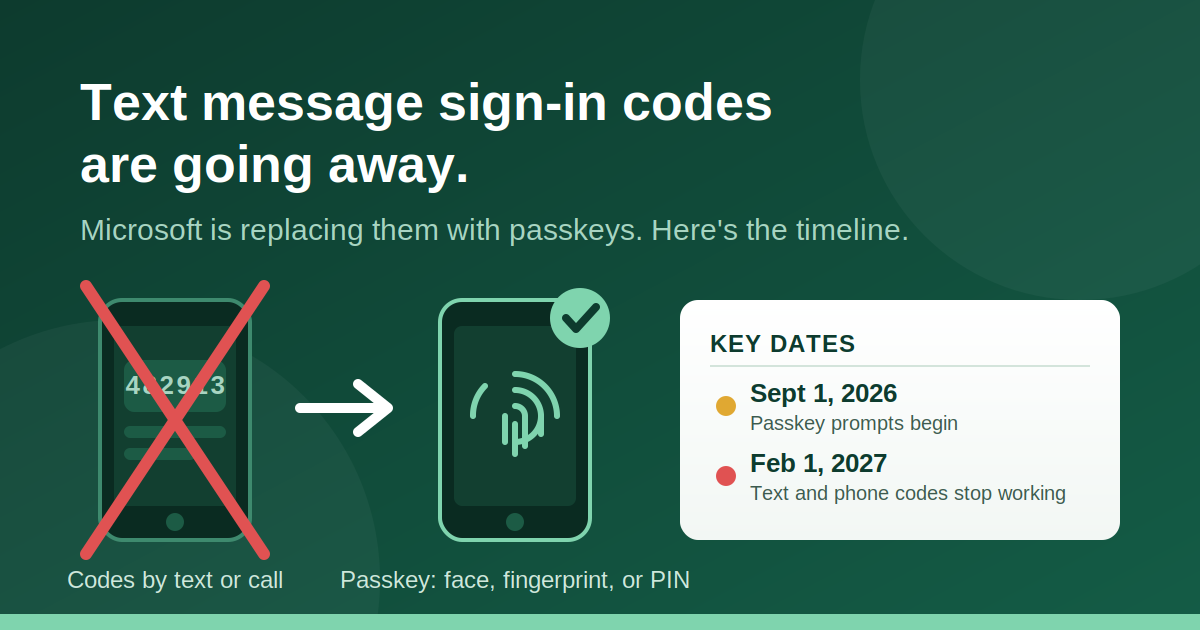
If your team signs in to Microsoft 365 by typing in a code from a text message or phone call, that routine is about to change. Microsoft announced that it is retiring text and voice codes for signing in, replacing them with something called a passkey.
This affects every business that uses Microsoft 365. There is no opt out. But here's the good news: the replacement is faster, safer, and easier than what you're doing today. And if you plan ahead, the switch is painless.
The Two Dates That Matter
September 1, 2026. Microsoft begins prompting anyone who still uses text or phone codes to set up a passkey. These prompts appear automatically during sign-in.
February 1, 2027. Text and phone call codes stop working entirely. Anyone who hasn't switched will be forced through a setup screen before they can get back into their account. Picture that happening to your office manager at 8:55 on a Monday morning.
The businesses that handle this well will make the switch on their own schedule, before Microsoft forces the issue.
Why Is Microsoft Doing This?
Because text message codes are the weakest link in account security, and criminals know it.
Here's how the scam usually works. An attacker gets your password from a data breach or a fake login page. Then they call or text pretending to be from IT or Microsoft and ask you to "read back the code we just sent to verify your identity." The moment you share that code, they're in your account. In more advanced attacks, criminals hijack your phone number entirely and receive your codes directly.
None of that works against a passkey. A passkey can't be read over the phone, typed into a fake website, or intercepted in transit. There is no code to steal.
What Is a Passkey, in Plain English?
A passkey lets you approve your sign-in with the same fingerprint, face scan, or PIN you already use to unlock your phone or computer.
That's it. No waiting for a text. No typing in six digits. You tap, glance, or scan, and you're in. Most people find it faster than what they do today, and it costs nothing extra on your Microsoft plan.
If someone on your team doesn't have a smartphone, there are other options, including built-in sign-in on their Windows computer or a small hardware key. Every situation has an answer.
What Should Your Business Do?
If you're a Big U Computers client, the honest answer is: nothing yet. We're already reviewing which accounts at each client still use text or phone codes. If any of your accounts are affected, we'll reach out to schedule the switch and walk each person through it. It takes a few minutes per person. That's the Peace of Mind we promise: we watch for changes like this so you don't have to.
If you're managing this yourself, here's the checklist:
- Find out who's affected. Check which users in your Microsoft account still rely on text or phone codes. Pay special attention to anyone who has a phone code as their only sign-in method. Those are the people who get locked out in February 2027.
- Don't forget password resets. The retirement also applies to password reset by text or phone, so those settings need attention too.
- Move people to passkeys before September 2026. Doing it early means your team hears about the change from you, not from a surprise popup.
- Flag the odd cases. Shared accounts, front desk computers, and employees without smartphones need a specific plan rather than a one-size-fits-all rollout.
The Bigger Picture
This is part of a shift happening across the entire industry. Apple, Google, and major banks are all moving to passkeys for the same reason: passwords and text codes simply can't stand up to modern attacks.
At Big U, we believe security should never feel like a burden or a mystery. That's why we explain changes like this in plain language, with No Geek-Speak, and why we handle the technical work personally for the businesses we support. Personal Service means you work with people who know your business, and We Won't Hold You Hostage means you'll always understand exactly what's changing in your own systems and why.
Questions? Let's Talk
If you're not sure whether your business is affected, or you want help planning the switch before the deadlines hit, reach out. Call us at 570.431.0051 or book a discovery call with me here. Five minutes of planning now beats a lockout in February 2027.