
September 22, 2026
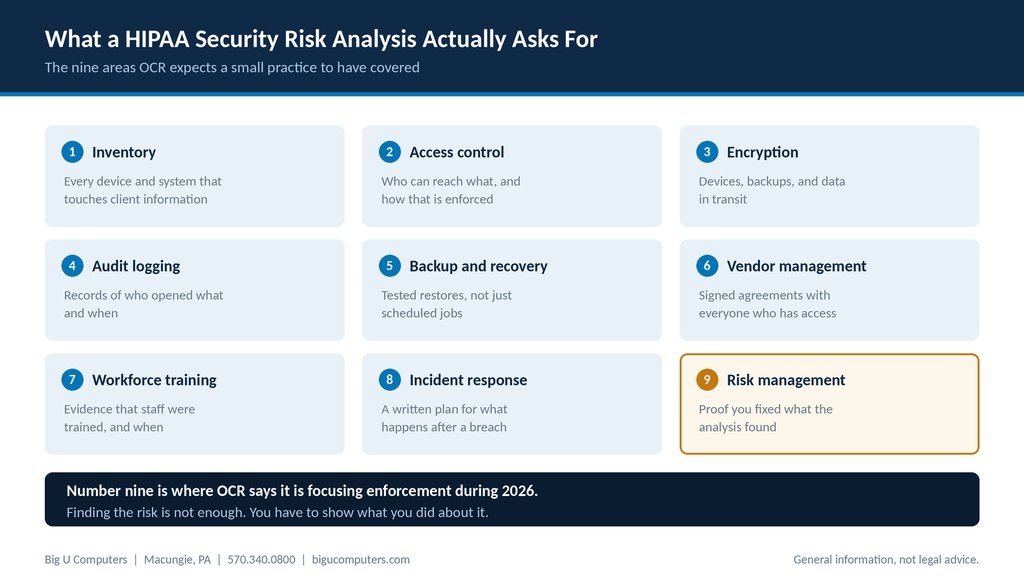
The nine areas a HIPAA security risk analysis covers at a small practice.
There is no pass or fail. A HIPAA security risk analysis is not an exam you sit, it is a written assessment you are required to perform and keep. What matters is that it exists, that it is current, that it covers every system holding client information, and that you can show what you did about the problems it found. A small practice can complete one in two to four weeks with help. The most common failure is not a bad score. It is having no documented analysis at all, or having one from four years ago that nobody acted on.
Here is what it covers, what evidence to gather, and the mistake that turns a routine finding into a penalty.
One note before we go further. This article is general information, not legal advice. We perform and support risk analyses, but we are not a law firm. Involve your own counsel or compliance advisor for anything specific to your practice.
What a Risk Analysis Actually Is, and Is Not
A risk analysis is a written document that identifies where electronic client information lives, what could go wrong with each place it lives, how likely and how damaging that would be, and what you are doing to reduce it.
Things it is not:
- It is not a vulnerability scan. A scan is a tool that finds technical weaknesses. A risk analysis is a document that considers people and process as well as technology.
- It is not a certification. Nobody issues a HIPAA certificate, and any vendor selling one is selling something HHS does not recognize.
- It is not a one time project. It has to stay current as your systems change.
- It is not just an IT exercise. Training, vendor agreements, and physical security all sit inside it.
The Nine Areas It Covers
Work through these in order. For each one, the question is the same: what do we have, where is the gap, and what are we doing about it?
1. Inventory
Every device, application, and service that touches client information. Workstations, laptops, phones, your records platform, email, backup, and anything a clinician uses from home. You cannot protect what you have not listed, and this is the step practices most often shortcut.
2. Access control
Who can reach what, and how that is enforced. Unique logins for every person, no shared accounts, multi-factor authentication, and a process for removing access when someone leaves. Former employee accounts left active are a recurring finding.
3. Encryption
Laptops and desktops, backups, and data moving across networks. Encryption is technically an addressable rather than required specification, which means you can choose an equivalent alternative, but you have to document why. In practice, encrypt the devices.
4. Audit logging
Records of who accessed what and when, retained long enough to be useful, and actually reviewed occasionally. Logs nobody looks at satisfy the letter and miss the point.
5. Backup and recovery
Backups that have been restored and tested, not merely scheduled. Write down the date of your last successful test restore. If you cannot, that is your finding.
6. Vendor management
A signed Business Associate Agreement with everyone who can reach client information, kept somewhere you could produce on request. This is usually the fastest gap to close.
7. Workforce training
Evidence that staff were trained on security and privacy, including when and on what. A sign-in sheet or a completion report from a training platform is fine. No record means it did not happen, as far as an investigator is concerned.
8. Incident response
A written plan covering who does what after a suspected breach, who gets called, and in what order. Two pages is plenty for a small practice, and having two pages is dramatically better than having none.
9. Risk management
What you did about everything the analysis found. This is the one people skip, and it is now the one that matters most.
The Mistake That Turns a Finding Into a Penalty
Performing the analysis and then filing it away is worse than not performing it, because you have now documented that you knew about a problem and left it alone.
HIPAA penalty tiers turn on what you knew and whether you corrected it. A practice that identified a risk, wrote a plan, and worked through it sits in a very different position from a practice that identified the same risk and did nothing. The Office for Civil Rights has said it is expanding its enforcement focus during 2026 from risk analysis into risk management, meaning not just whether you looked, but whether you acted.
The practical version: every finding needs an owner, a target date, and a note when it is closed. A simple spreadsheet is enough. What you are building is a record that shows movement.
What Evidence to Have Ready
If someone asked for proof tomorrow, this is the folder you would want to hand them.
| Evidence | What good looks like |
|---|---|
| The risk analysis document | Dated within the last twelve months, covering every system on your inventory |
| Remediation tracker | Findings with owners, target dates, and closure notes |
| Asset inventory | Current list of devices and applications, including remote and personal devices in use |
| Signed BAAs | One per vendor with access, all in one place |
| Training records | Names, dates, and topics covered |
| Backup restore test log | Date of last successful test and who performed it |
| Access review | Evidence that accounts were reviewed and departed staff removed |
| Incident response plan | Written, dated, and known to the people named in it |
| Policies and procedures | Security and privacy policies staff have actually seen |
Most small practices have about half of this somewhere and have never gathered it into one place. Gathering it is itself worth doing, because the gaps become obvious immediately.
How Often You Have to Do This
The rule requires the analysis to be accurate and thorough, and updated as needed rather than on a fixed calendar. In practice, treat it as annual, and refresh it sooner whenever something material changes.
- You change or add a records platform
- You open a second location
- You move to a new email or cloud provider
- Staff count changes significantly
- You start offering telehealth, or stop
- You experience an incident, even a small one
Who Should Perform It
You have three realistic options, and all three are legitimate.
- Do it yourself using the HHS Security Risk Assessment Tool, which is free and designed for small practices. Slowest, cheapest, and genuinely workable if someone has the time.
- Have your IT provider run it. Faster, because they already know your environment, and most of the findings will be theirs to fix. The obvious caveat is that they are assessing their own work, so ask how they handle that.
- Hire an independent assessor. Most defensible, most expensive, and worth it if you have had an incident, are growing quickly, or want a genuinely outside view.
For a practice between 10 and 50 users with no internal IT, option two with an honest provider is usually the right balance. Ask them directly how they report on gaps that exist in their own service.
About Big U Computers
Big U Computers is a family owned IT provider in Macungie, Pennsylvania, serving practices and small businesses from Allentown and Bethlehem through Danville, Bloomsburg, and Lewisburg.
- Ten years supporting behavioral health IT in Pennsylvania
- Implemented and currently maintains a Credible records platform environment
- We sign a Business Associate Agreement with every covered entity client
- One hour response target and four hour restoration target for mission critical issues, written into our service agreement
- After hours coverage to midnight on business days, plus weekends and holidays
- 96.6 percent of 2,375 tickets resolved remotely, January 1 through September 18, 2026
- 24/7/365 network and security monitoring
- We work to HIPAA and NIST frameworks and are knowledgeable on PCI
- Full written documentation of your network, licenses, and passwords, in plain English
Not sure whether your risk analysis would hold up? Call 570.340.0800 or book a free consult. We will walk the nine areas with you and tell you which ones you can already evidence, no charge.
This article is general information and not legal advice. Consult your own counsel or compliance advisor about your specific obligations.
Big U Computers | P.O. Box 523, Macungie, PA 18062 | 570.340.0800 | bigucomputers.com