
September 22, 2026
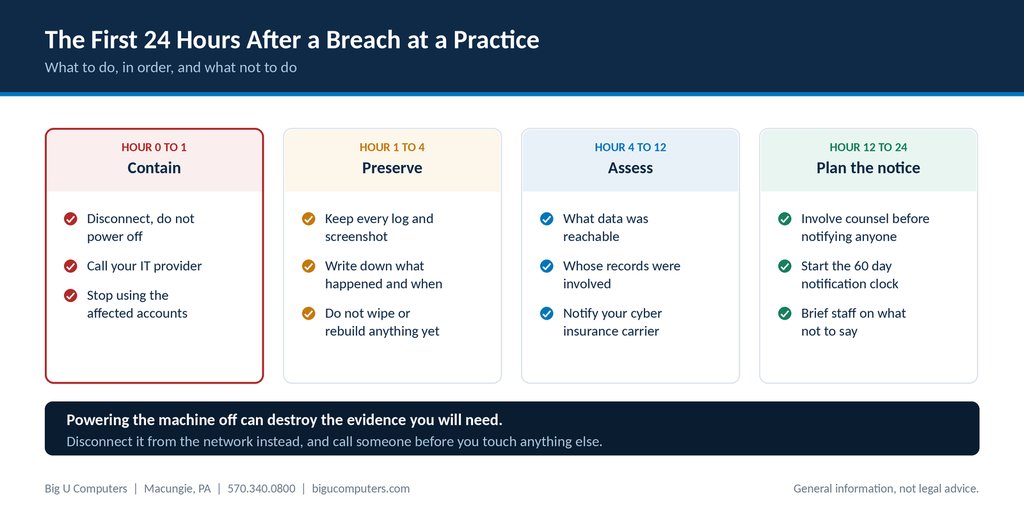
The first day, in order. Containment, preservation, assessment, then planning the notice.
Disconnect the affected device from the network, but do not power it off. Call your IT provider immediately. Preserve every log and screenshot rather than cleaning anything up. Work out what data was reachable before you decide what to tell anyone, and involve counsel before you notify a single client. HIPAA gives you up to 60 days to notify affected individuals, so the first day is for containment and facts, not announcements. The instinct to shut everything down and start fixing is the instinct that destroys the evidence you will need.
Here is the first 24 hours in order. Print this and put it somewhere you could reach it if the network were down.
One note before we go further. This article is general information, not legal advice. Breach response is legally consequential and fact specific. Get counsel involved early, and follow their instructions over anything written here.
Hour 0 to 1: Contain Without Destroying Evidence
Something has happened. A ransom note on a screen, a clinician reporting that their password stopped working, an alert from your security monitoring, a laptop missing from a car.
Disconnect, do not power off
Unplug the network cable or turn off the wireless on the affected machine. Leave it running. Powering it off wipes memory that may hold the only evidence of what an attacker was doing, and in some ransomware cases it destroys recovery options as well.
This is counterintuitive, which is why it belongs in writing before an incident rather than being worked out during one.
Call your IT provider
Now, not after you have tried a few things. This is what a mission critical response commitment is for. If you have security monitoring in place, they may already know.
Stop using the affected accounts
If an account is suspected of being compromised, stop using it. Do not simply change the password and carry on, because that can alert an attacker who still has a session open, and your provider may want to see what the account does next.
Hour 1 to 4: Preserve What Happened
The temptation now is to tidy up. Resist it completely. Anything you delete, reset, or rebuild in the next few hours is evidence you will wish you had in three weeks.
- Screenshot everything, including error messages, ransom notes, and unusual emails. Photograph screens with a phone if you cannot capture them any other way.
- Do not wipe, reimage, or restore any affected machine until someone qualified says it is safe to.
- Write a plain timeline as you go: what was noticed, by whom, at what time, and what was done in response. Times matter later and memories get worse quickly.
- Keep the affected device physically secure and do not let anyone use it.
- Preserve logs. Your IT provider should be doing this, but ask them explicitly to confirm it, because some logs age out within days.
Designate one person to keep the timeline. During an incident everyone assumes someone else is writing it down, and afterward nobody has.
Hour 4 to 12: Work Out What Was Actually Reachable
Now the question becomes scope. Not what was definitely taken, which often cannot be known, but what was reachable from the compromised point.
- Which systems could that account or device reach? Email, the records platform, file storage, backups?
- Whose records were in those systems? Roughly how many individuals?
- Were substance use disorder records involved? If so, 42 CFR Part 2 obligations come into play alongside HIPAA.
- Was the data encrypted at rest? Properly encrypted data may change the analysis significantly.
- Is there evidence of data leaving, or only of access?
Also in this window: notify your cyber insurance carrier. Most policies require prompt notice, and many will provide a breach coach, forensic resources, and counsel as part of the coverage. Practices routinely forget this and pay for services their policy would have covered. If you do not know whether you have cyber coverage, find out this week rather than during an incident.
Hour 12 to 24: Plan the Notification, Do Not Send It Yet
By now you should have a rough picture. This is where practices make their most expensive mistake, which is notifying quickly to seem responsible.
Involve counsel before notifying anyone
Whether an incident is a reportable breach is a legal determination involving a formal risk assessment. Notifying when you were not required to can create liability and alarm clients unnecessarily. Notifying with wrong facts is worse than notifying a week later with right ones.
Understand the clock, and that you have some time
HIPAA requires notification to affected individuals without unreasonable delay and no later than 60 days from discovery. Sixty days is an outer limit rather than a target, but it does mean the first day is for facts, not announcements.
Brief your staff on what not to say
Staff will be asked by clients, family, and each other. Give them one sentence: we are aware of a technical issue, it is being investigated, and we will share accurate information when we have it. Name one person who handles anything further. Nothing goes on social media.
The Clocks That Are Now Running
| Obligation | Deadline | Notes |
|---|---|---|
| Notify affected individuals | Within 60 days of discovery | Written notice, without unreasonable delay |
| Notify HHS, 500 or more individuals | Within 60 days of discovery | Also requires notice to prominent media in the affected area |
| Notify HHS, fewer than 500 | Within 60 days of year end | Logged and submitted annually |
| Notify your cyber insurer | Per your policy, usually immediately | Check the policy wording, not your memory of it |
| Business associate notifies you | Within 60 days, per your agreement | If the breach happened at a vendor, their clock feeds yours |
| Part 2 considerations | Alongside HIPAA | Applies if substance use disorder records were involved |
| State requirements | Varies | Pennsylvania has its own breach notification law. Counsel will advise. |
The one people miss is the second row. Media notification at 500 individuals is not discretionary, and for a practice that size it changes the shape of the response considerably.
Five Things Not to Do
- Do not power off the affected machine. Disconnect it from the network instead.
- Do not pay a ransom before talking to counsel and your insurer. There are legal considerations, and payment does not reliably produce a working decryption key.
- Do not delete the suspicious email, the ransom note, or anything else that looks like a mess. It is evidence.
- Do not notify clients before you know the facts and counsel has advised.
- Do not let the incident go undocumented because it turned out to be minor. Small incidents that were handled well are exactly what you want on record in your risk management file.
What to Have Ready Before Any of This Happens
Everything above is easier if these six things exist in advance. None of them take long.
- A printed copy of this plan, or your own version, at the front desk. During an incident the network may be the thing you cannot use.
- Your IT provider's emergency number, including after hours, written on paper.
- Your cyber insurance policy number and the carrier's claims number.
- Counsel's contact details, chosen before you need them rather than searched for at 9 p.m.
- A current list of what systems hold client information and roughly how many individuals are in each. This comes straight out of your risk analysis.
- One named person responsible for keeping the timeline, and a backup for when that person is on leave.
Practices that have these six things handle incidents in hours. Practices that do not spend the first day working out who to call, which is the day the evidence was still there.
About Big U Computers
Big U Computers is a family owned IT provider in Macungie, Pennsylvania, serving practices and small businesses from Allentown and Bethlehem through Danville, Bloomsburg, and Lewisburg.
- Ten years supporting behavioral health IT in Pennsylvania
- Implemented and currently maintains a Credible records platform environment
- We sign a Business Associate Agreement with every covered entity client
- One hour response target and four hour restoration target for mission critical issues, written into our service agreement
- After hours coverage to midnight on business days, plus weekends and holidays
- 96.6 percent of 2,375 tickets resolved remotely, January 1 through September 18, 2026
- 24/7/365 network and security monitoring
- We work to HIPAA and NIST frameworks and are knowledgeable on PCI
- Full written documentation of your network, licenses, and passwords, in plain English
Does your practice have an incident plan, or a hope? Call 570.340.0800 or book a free consult. We will help you build a one page plan you can print and keep at the front desk, no charge.
This article is general information and not legal advice. Breach response is legally consequential. Involve qualified counsel early.
Big U Computers | P.O. Box 523, Macungie, PA 18062 | 570.340.0800 | bigucomputers.com