September 22, 2026
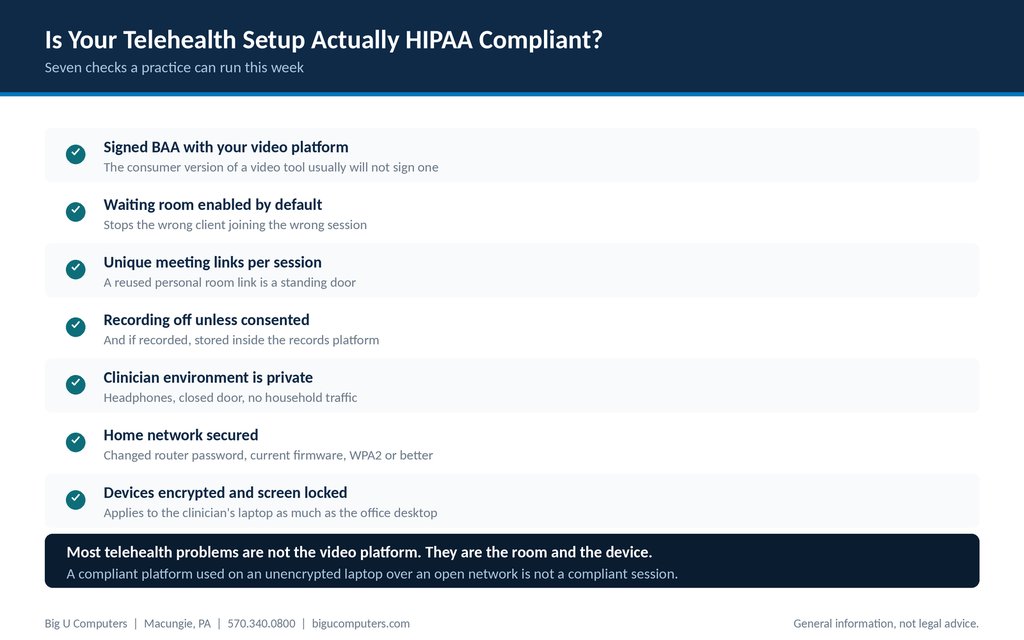
Seven checks covering the platform, the configuration, the room, and the device.
Probably not entirely, and the gap is usually not the video platform. Most practices chose a platform that will sign a Business Associate Agreement and then stopped there. Compliance depends just as much on how that platform is configured, what the clinician's room looks like, and whether the laptop running the session is encrypted and on a secured network. A properly licensed platform used on an unencrypted personal laptop over an open network is not a compliant session. Seven checks will tell you where you stand, and most practices can close the gaps in a week.
Here they are, in order of how often they turn out to be a problem.
One note before we go further. This article is general information, not legal advice. Telehealth also involves state licensure and consent rules that vary and that sit outside what an IT company can advise on.
The Enforcement Discretion Is Over
During the COVID-19 public health emergency, the Office for Civil Rights said it would not impose penalties for good faith telehealth delivered over everyday video applications that were not HIPAA compliant. That flexibility ended in 2023, along with a short transition period afterward.
A number of practices started on a consumer video tool in 2020, found it worked, and never revisited the decision. If that describes you, this is the check to run first, because the ground genuinely shifted underneath that choice.
Check One: The Platform
Your video platform is a business associate. It transmits protected health information on your behalf, so it needs a signed Business Associate Agreement, and you need a copy of it.
The practical test is simple. Go and find the signed agreement. If you cannot produce it in five minutes, that is the first gap.
Two things commonly go wrong here:
- The practice is using the free or consumer tier of a platform that offers a compliant paid tier. The compliant tier and the consumer tier are often the same software with different terms, and the agreement only comes with the paid one.
- The practice signed up years ago and nobody knows whether the agreement was ever executed, or under whose account.
We are deliberately not naming or ranking platforms here. Vendor comparisons go stale fast, and the criterion is stable: will they sign, and do you have the signed copy?
Checks Two Through Four: How the Platform Is Configured
A compliant platform with careless settings still produces incidents. These three are the configuration items that matter most.
Check two: waiting room enabled by default
Without a waiting room, anyone with the link joins immediately. In a practice running back to back sessions, that means a client can land in the end of someone else's appointment. This is the most common telehealth privacy incident in behavioral health, and it is a single setting.
Check three: unique meeting links per session
Many clinicians use a personal meeting room with one permanent link because it is convenient. That link is a standing door. A client from six months ago still has it. Generate a link per session, or per client, and let the platform handle it.
Check four: recording off unless there is consent
Recording should be off by default. If a session is recorded with consent, the recording is a clinical record and belongs inside your records platform, not in the video platform's cloud storage indefinitely and not on a clinician's desktop. Decide where recordings live before anyone makes one.
Checks Five Through Seven: The Room and the Device
This is the part most telehealth compliance articles skip entirely, and it is where practices actually get exposed.
Check five: the clinician's environment is private
A clinician working from home needs a door that closes, headphones so the client's side of the conversation is not audible, and a background that does not reveal anything about their home or other clients. Household members walking through a session is a confidentiality problem regardless of how compliant the software is.
Worth saying to clinicians directly: headphones are not optional, and a kitchen table during school holidays is not a clinical space.
Check six: the home network is secured
The router password changed from the factory default, firmware reasonably current, WPA2 or better encryption, and no session conducted over public Wi-Fi. A coffee shop or a hotel lobby is not a place to hold a therapy session, and that should be in your policy in writing.
Check seven: the device is encrypted and screen locked
Whatever laptop runs the session needs full disk encryption, an automatic screen lock, a current operating system, and management that lets you remove access if it is lost. If the clinician owns the device personally, that is workable, but it has to be enrolled.
What About the Client's Side?
You are not responsible for securing your client's home network or their phone, and you cannot be. HIPAA does not require you to.
What you can do costs nothing and reduces problems noticeably:
- Tell clients at intake that they should join from a private space where they will not be overheard.
- Mention that headphones help on their end too.
- Note that connecting over public Wi-Fi is not a good idea for a session.
- Document that you told them. A line in your telehealth consent form covers it.
If a client chooses to take a session in a parked car outside a grocery store, that is their decision to make. Your obligation is to have given them the information.
Documenting Telehealth in Your Risk Analysis
Telehealth belongs in your HIPAA security risk analysis as its own line, and at many practices it is missing entirely because it was added in a hurry in 2020 and never formally assessed.
What to record:
| Item | What to document |
|---|---|
| Platform | Which one, what tier, and the date the Business Associate Agreement was signed |
| Configuration | Waiting room, unique links, recording settings, and who is responsible for maintaining them |
| Devices | Which devices are used for sessions, who owns them, and whether each is encrypted and enrolled |
| Locations | Whether clinicians work from home, and what the policy requires of that space |
| Recordings | Whether sessions are ever recorded, where recordings are stored, and how long they are kept |
| Training | That clinicians were trained on the telehealth policy, with dates |
| Consent | That clients are informed about telehealth privacy at intake |
Practices that can produce this table are in a substantially better position than practices that cannot, and building it takes an afternoon.
About Big U Computers
Big U Computers is a family owned IT provider in Macungie, Pennsylvania, serving practices and small businesses from Allentown and Bethlehem through Danville, Bloomsburg, and Lewisburg.
- Ten years supporting behavioral health IT in Pennsylvania
- Implemented and currently maintains a Credible records platform environment
- We sign a Business Associate Agreement with every covered entity client
- One hour response target and four hour restoration target for mission critical issues, written into our service agreement
- After hours coverage to midnight on business days, plus weekends and holidays
- 96.6 percent of 2,375 tickets resolved remotely, January 1 through September 18, 2026
- 24/7/365 network and security monitoring
- We work to HIPAA and NIST frameworks and are knowledgeable on PCI
- Full written documentation of your network, licenses, and passwords, in plain English
Want to know which of the seven checks your practice would pass today? Call 570.340.0800 or book a free consult. We will run them with you, no charge.
This article is general information and not legal advice. Telehealth also involves state licensure and consent requirements outside the scope of this article.
Big U Computers | P.O. Box 523, Macungie, PA 18062 | 570.340.0800 | bigucomputers.com