
September 22, 2026
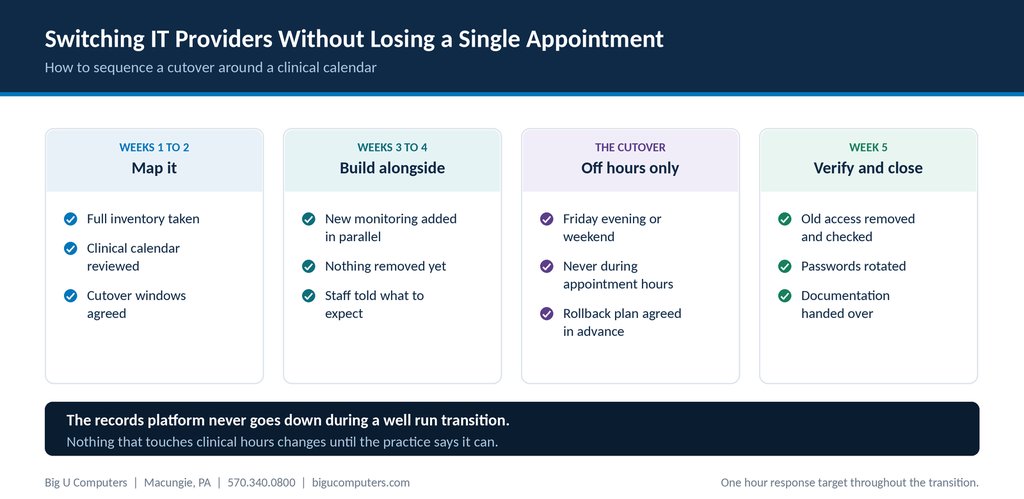
How a transition is sequenced around a clinical calendar.
A well run IT transition costs a practice zero appointments. The records platform never goes down, clinicians never sit waiting, and most staff notice nothing beyond a new phone number for support. That happens when the new provider builds alongside the old setup for several weeks and only switches things over outside clinical hours. Transitions go wrong when someone changes a critical system on a Tuesday morning because it was convenient for them. Plan on about five weeks end to end, with the cutover itself on a Friday evening or a weekend.
Here is how the sequencing works, what causes disruption when it goes wrong, and what to ask before you sign with anyone.
Why Practices Stay With Providers They Have Outgrown
Almost every practice administrator who is unhappy with their IT company says a version of the same thing: we know we should change, but we cannot afford for anything to break.
That instinct is correct and it is also the reason nothing changes for years. The fear is specific, and worth naming, because each part of it has an answer.
- The records platform will go down and clinicians will lose a day. It should not go down at all, because nothing about it changes during a transition.
- Something will break and the old provider will be gone. That is why the overlap period exists.
- We will lose access to something and nobody will know the password. That is a documentation problem, and you can check it before you commit to anything.
- It will take months and consume the administrator's attention. Five weeks, with a handful of scheduled conversations, is realistic.
The point is not that transitions are risk free. It is that the risk is manageable and concentrated in a few specific places.
The Rule That Makes This Work
One principle drives everything else: nothing that touches clinical hours changes during clinical hours.
A good provider builds their monitoring, security, and management tooling alongside what is already there. Two systems run in parallel for a few weeks. Nothing is removed until the replacement is proven. The actual switchover, the moment where the old is turned off, happens when the building is empty.
That sounds obvious. It is also the difference between a transition nobody notices and one that gets talked about for two years.
A Five Week Transition, Week by Week
Weeks 1 and 2: map it
The new provider inventories everything, which means every device, every application, every account, and every vendor with access. They also ask for something most providers never ask for: your clinical calendar.
They need to know when you see clients, when your busiest mornings are, when clinicians finish in the evening, and whether you run weekend groups. That calendar determines every subsequent decision about timing. A provider who never asks about it is planning around their own convenience.
By the end of week two you should have an agreed cutover window in writing.
Weeks 3 and 4: build alongside
New monitoring agents, security tooling, and backup configuration get deployed in parallel with whatever is already running. Nothing gets removed. If the new tooling has a problem, the old setup is still there.
This is also when staff should hear what is happening and what will change for them, which for most people is just the support phone number and email address.
The cutover: off hours only
Friday evening or a weekend. Never during appointment hours, and never on a Monday, because Monday morning is when problems surface and you want a full business day of both providers available afterward.
Before it starts, agree what the rollback is. If something does not work by a set time, what gets reversed and who decides? Having that written down turns a stressful evening into a procedure.
Week 5: verify and close
The old provider's access gets removed and verified as removed. Every shared password is rotated. Documentation is handed over and stored where the practice controls it. If your previous provider was a business associate, you should also get written confirmation that your data has been returned or destroyed.
Four Things That Actually Cause Disruption
In transitions that go badly, it is almost always one of these four, and all four are avoidable.
1. Changing network equipment during business hours
Replacing a firewall or reconfiguring a switch takes down the connection to everything, including the records platform. This is off hours work. Full stop.
2. Email and Microsoft 365 changes done carelessly
Email is the highest risk item in any transition because it affects everyone at once and because misconfiguration can lose messages rather than just delay them. Whoever does this should be doing it deliberately, with a tested plan, outside business hours.
3. Multi-factor authentication rolled out to everyone on the same morning
Even a well planned MFA rollout produces a wave of confused people. Do it in stages, with support standing by, and not on a day with a full schedule.
4. No overlap period
If the old provider's access is cut off before the new one is fully operational, any problem in that gap has nobody to fix it. Overlap costs a little money and removes most of the risk.
What to Tell Your Staff, and When
Transitions feel more disruptive than they are when staff hear about them through rumor. A short, plain message at the start of week three covers it.
What they need: the fact that the practice is changing IT providers, the date it takes effect, the new number and email for support, a note that their day to day will not change, and who to ask if something seems off.
What they do not need: the reasons you left, the commercial details, or a technical explanation of what is being migrated. Keep it to what affects them.
One practical addition: ask clinicians to tell you about anything that has been quietly annoying them, the printer that jams, the laptop that takes six minutes to start. A transition is the one moment when those things get fixed as part of onboarding rather than raised as a separate request.
What to Ask a Prospective Provider About Their Onboarding
- Walk me through your onboarding week by week. A provider who has done this before will answer fluently. One who improvises an answer has not.
- When do you schedule cutover work? The answer should include the words evening or weekend without you prompting.
- Will you ask for our clinical schedule before planning anything?
- How long do you run alongside our current provider before anything is removed?
- What is the rollback plan if the cutover has a problem?
- What does onboarding cost, and is it a fixed fee or hourly?
About Big U Computers
Big U Computers is a family owned IT provider in Macungie, Pennsylvania, serving practices and small businesses from Allentown and Bethlehem through Danville, Bloomsburg, and Lewisburg.
- Ten years supporting behavioral health IT in Pennsylvania
- Implemented and currently maintains a Credible records platform environment
- We sign a Business Associate Agreement with every covered entity client
- One hour response target and four hour restoration target for mission critical issues, written into our service agreement
- After hours coverage to midnight on business days, plus weekends and holidays
- 96.6 percent of 2,375 tickets resolved remotely, January 1 through September 18, 2026
- 24/7/365 network and security monitoring
- We work to HIPAA and NIST frameworks and are knowledgeable on PCI
- Full written documentation of your network, licenses, and passwords, in plain English
Thinking about a change but worried about disruption? Call 570.340.0800 or book a free consult. We will map out what a transition would look like against your actual schedule before you commit to anything.
Big U Computers | P.O. Box 523, Macungie, PA 18062 | 570.340.0800 | bigucomputers.com