September 22, 2026
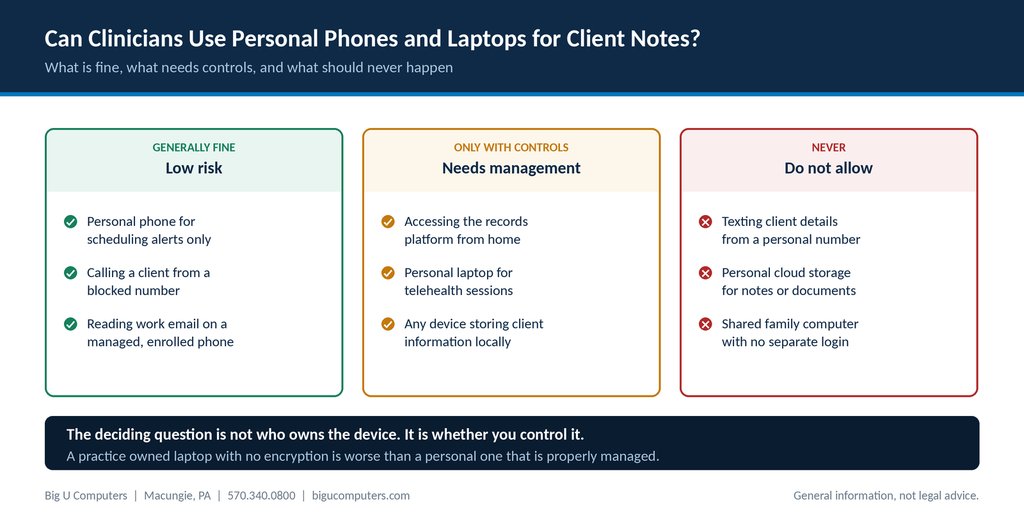
What is generally fine, what needs controls, and what should never happen.
Yes, with controls. HIPAA does not prohibit personal devices. What it requires is that any device reaching client information has appropriate safeguards, which in practice means encryption, a screen lock, the ability to remove access remotely, and a written policy staff have actually agreed to. The question that decides each case is not who bought the device. It is whether your practice can control what happens on it. A practice owned laptop with no encryption is a bigger problem than a clinician's personal laptop that is properly managed.
Here is where the lines fall, what managing a personal device actually involves, and the one habit that causes more exposure than everything else combined.
One note before we go further. This article is general information, not legal advice. Device policy interacts with employment law as well as HIPAA. Have counsel review any policy before you ask staff to sign it.
The Short Answer, and the Question That Actually Decides It
Practices usually frame this as a permission question. Are we allowed to let clinicians use their own phones? The regulation does not answer it that way.
What HIPAA asks is whether you have assessed the risk and applied reasonable safeguards. So the useful question is: if this device were left in a coffee shop this afternoon, what would happen?
- If the answer is that it is encrypted, locked, holds nothing locally, and access can be revoked in ten minutes, you are in good shape.
- If the answer is that it has client names in a notes app and no passcode, you have a reportable breach and a bad week ahead.
Everything below is just a way of getting more devices into the first category.
Generally Fine, Needs Controls, and Never
Generally fine
- A personal phone receiving scheduling alerts that contain no client detail
- Calling a client from a blocked or practice routed number
- Reading work email on a phone that is enrolled in your practice's management, with a passcode and remote wipe available
- Looking something up in the records platform through a browser, on a managed device, with nothing downloaded
Only with controls
- Accessing the records platform from a home computer
- A personal laptop used for telehealth sessions
- Any device that stores client information locally, even temporarily
- A personal tablet used to take notes during a session
Controls here means encryption on, screen lock on, multi-factor authentication for the records platform, the device enrolled in management, and a written agreement from the clinician.
Never
- Texting client names, appointment details, or clinical content from a personal number
- Saving notes or documents to personal cloud storage, including a personal Google Drive, iCloud, or Dropbox account
- Working on a shared family computer with no separate login
- Emailing client information from a personal email account, in either direction
- Photographing a paper record or a screen with a personal phone camera
That last one is more common than administrators expect, and it is worth naming explicitly in your policy, because staff often do it with good intentions.
What Managing a Personal Device Actually Involves
Clinicians hear device management and picture their employer reading their text messages. That is worth addressing directly, because the fear is what makes people avoid enrollment and use workarounds instead.
Modern management on a personal device is generally scoped to the work portion of the device only. What it typically does:
| What management can do | What it does not do |
|---|---|
| Require a passcode on the device | Read personal text messages |
| Confirm the device is encrypted | See personal photos |
| Remove work accounts and work data remotely | Track personal browsing |
| Keep work email inside a managed app | Wipe personal apps or contacts |
| Block work data from being copied into personal apps | Monitor personal calls |
| Require the operating system to be reasonably current | Give the practice the clinician's personal passwords |
Say this plainly to staff when you roll it out. The alternative to enrollment is not privacy. It is clinicians quietly doing work on unmanaged devices, which is worse for everyone including them.
The Texting Problem
This is the single most common exposure in behavioral health practices, and it happens for entirely sympathetic reasons.
A client texts a clinician's personal cell about rescheduling. The clinician answers, because not answering feels cold. Now there is a thread on a personal phone containing a client's name, the fact that they are in treatment, and their appointment times. That is protected health information sitting in an unmanaged consumer messaging app, backed up to a personal cloud account, and visible on a lock screen.
Nobody did anything malicious. The practice now has a problem anyway.
Three things fix it, in order of how much effort they take.
- Give clinicians a way to be reachable that is not their personal number. A practice phone system with mobile apps means a clinician can call and text from the practice number, on their own phone, with the record staying in the practice's system.
- Tell clients at intake how to reach the practice, and stick to it. Most clients text the personal number because at some point someone gave it to them.
- Write it into the policy explicitly, so it is not a judgment call in the moment.
If a client does text a personal number despite all this, the right response is to reply briefly redirecting them to the proper channel, without discussing anything clinical, and then to document that it happened.
A Device Policy You Can Put in Place This Week
A device policy for a practice of this size does not need to be long. One page covering these eight points is enough.
- Which devices are permitted to access client information, and which are not.
- A requirement that any device with access is encrypted and screen locked.
- A requirement that such devices are enrolled in the practice's management, with a plain description of what that means and does not mean.
- A prohibition on storing client information in personal cloud accounts or personal email.
- A prohibition on texting client information from personal numbers, with the approved alternative named.
- A requirement to report a lost or stolen device immediately, with the number to call, and an explicit statement that nobody will be punished for reporting quickly.
- What happens to work data on the device when the clinician leaves.
- A signature line, because unsigned policies are not evidence of anything.
Point six deserves emphasis. If staff fear the reaction, they delay reporting, and delay is what turns a recoverable situation into a reportable breach. Say out loud that fast reporting is the behavior you want.
What Happens When a Clinician Leaves
Departures are where personal device policies get tested, and where practices most often find out theirs was theoretical.
- Work accounts should be disabled the same day, not at the end of the week.
- Work data should be removed from any personal device, which is only possible if the device was enrolled while they still worked there.
- If clients have the departing clinician's personal number, they will keep using it. Decide in advance how that is handled, because it is a clinical continuity issue as much as a privacy one.
- Record what was removed and when. That record is part of your access review evidence.
A practice that cannot remove work data from a departed clinician's phone has a gap that shows up in a risk analysis, and it is not fixable retroactively.
About Big U Computers
Big U Computers is a family owned IT provider in Macungie, Pennsylvania, serving practices and small businesses from Allentown and Bethlehem through Danville, Bloomsburg, and Lewisburg.
- Ten years supporting behavioral health IT in Pennsylvania
- Implemented and currently maintains a Credible records platform environment
- We sign a Business Associate Agreement with every covered entity client
- One hour response target and four hour restoration target for mission critical issues, written into our service agreement
- After hours coverage to midnight on business days, plus weekends and holidays
- 96.6 percent of 2,375 tickets resolved remotely, January 1 through September 18, 2026
- 24/7/365 network and security monitoring
- We work to HIPAA and NIST frameworks and are knowledgeable on PCI
- Full written documentation of your network, licenses, and passwords, in plain English
Want a device policy that fits how your clinicians actually work? Call 570.340.0800 or book a free consult. We will tell you which of your devices are already covered and which are not.
This article is general information and not legal advice. Have counsel review any workforce policy before implementing it.
Big U Computers | P.O. Box 523, Macungie, PA 18062 | 570.340.0800 | bigucomputers.com